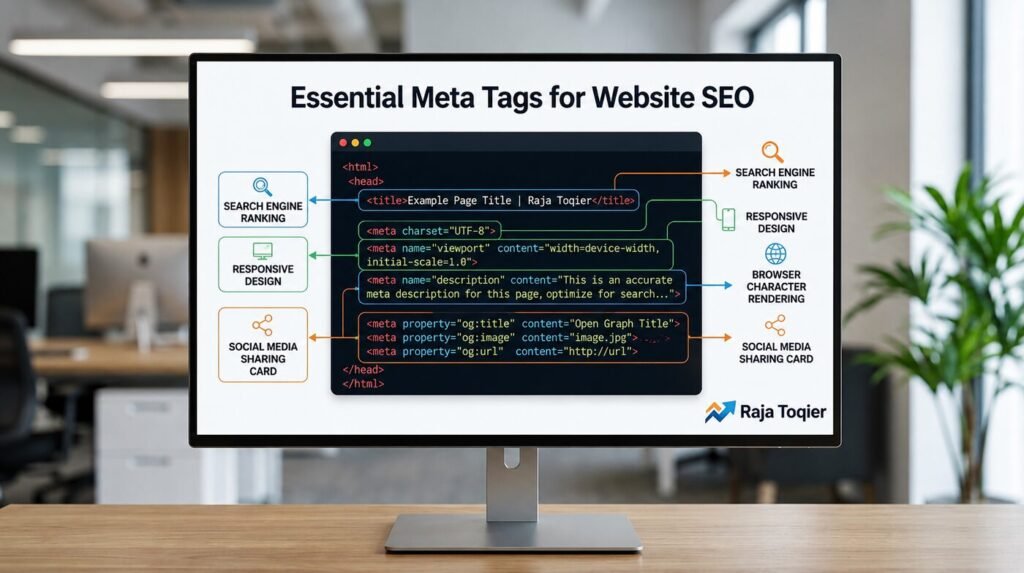
What Are Meta Tags on a Website and Why Are They Critical for SEO?
Meta tags are structural HTML code snippets embedded within a webpage’s <head> container that instruct search engines, social platforms, and AI crawlers how to interpret, index, and display a page’s content. Beyond traditional ranking algorithms, clean page metadata directly impacts indexing budgets, click-through rates (CTR), and data mapping pathways within AI-generated search environments. The best way to ensure these tags are configured correctly is to work with an experienced seo technology company.
Meta tags are far from just decorative, even if the average visitor may never notice them. They’re the first thing a crawler reads, before it even touches your visible content, and they still dictate how your pages are ranked, snippeted and shared in 2026.
Get a Free Technical SEO Audit
The HTML <head> Container: How Search Engine Crawlers Read Page Metadata
When a search engine crawler or an AI program scans your website, it checks the behind-the-scenes layout first. This happens inside the HTML <head> container, a specific part of the code that holds important instructions meant for machine reading rather than human eyes.
To maximize your site’s visibility, this backend section needs to remain clean, simple, and light. If it gets filled up with bloated scripts or poorly structured code blocks, search bots have to work much harder to process the page. This drain on resources can easily slow down your indexing schedule or even keep your site out of modern AI-generated answers.
The way your site’s header structure is set up also directly changes how users experience your pages. For example, setting up a proper viewport tag ensures your site loads perfectly on mobile screens, directly protecting your Core Web Vitals performance metrics from bad errors. Building a pristine code map from the start helps search engines quickly understand your target entities. If you need help structuring this invisible code layer perfectly, partnering with a specialist in technical SEO solutions ensures your platform’s underlying architecture matches exactly what next-generation search engines look for.
Essential Website Meta Tags
| Meta Tag Name | What It Does for Users & SEO | Why AI Search Engines Look at It |
| Title Tag | Displays your page name in search results and browser tabs. | Gives AI models the instant topic of the page. |
| Meta Description | Writes the small summary paragraph below your title in Google. | Helps AI summarize what your page covers. |
| Viewport Tag | Make sure your website formats properly and loads neatly on mobile screens. | Signals to AI that your site provides a good mobile experience. |
| Robots Tag | Tells search programs whether they are allowed to save and read your page. | Gives AI crawlers direct permission to scan your content data. |
| Canonical Tag | Protects your website from being flagged for duplicate content copies. | Tells AI exactly which URL link is the master version. |
| Open Graph Tags | Controls the image and text shown when your page link is shared on social media. | Connects your website’s relationship to social media channels. |
Essential Core Meta Tags Required for Modern Search Engine Indexing
Not all tags inside <head> have the same weight. Some of them are truly load-bearing, and getting them wrong has visible consequences for rankings and rendering.
Character Encoding (charset=”UTF-8″) and Viewport Configurations for Responsive Rendering
Character encoding tells the browser how to read every byte on the page and viewport configuration tells it how to scale that page across devices. Failing either one is a fast way to break rendering for a good chunk of your traffic.
| Configuration | Correct Syntax | Flawed Syntax | Impact |
|---|---|---|---|
| Character Set | <meta charset=”UTF-8″> | <meta charset=”ASCII”> or omitted | Garbled special characters, broken symbols in SERP snippets |
| Viewport | <meta name=”viewport” content=”width=device-width, initial-scale=1″> | <meta name=”viewport” content=”width=1024″> or omitted | Content fails to scale on mobile, hurting mobile-first indexing |
Meta Descriptions and Robots Directives: Controlling Crawlers and SERP Snippet Optimization
The meta description does not directly affect rankings but it has a huge impact on whether someone clicks. Meanwhile, robot directives decide whether a page is indexed at all.
- Your meta description should be under 160 characters and start with a strong benefit or call to action.
- Use <meta name=”robots” content=” index, follow”> on the pages you want to be crawled and indexed.
- Use <meta name=”robots” content=”noindex, follow”> for thin or duplicate pages you want crawlers to still crawl through.
- You may control how much of your content is shown by search engines by setting max-snippet, max-image-preview, and max-video-preview values.
Your Technical SEO with an Expert Fix
Honorary Meta Elements: Managing Titles and Canonical Links for Duplicate Content Mitigation
Note that the <title> tag and the <link rel=”canonical”> element are separate DOM nodes, technically not <meta> tags in the strictest sense. In practice, search engines treat them as belonging to the same metadata family because they do the same job, which is to tell a crawler exactly what a page is and which version of it is authoritative.
Optimizing the Title Tag for Semantic Search Engine Authority
Your title tag is still one of the strongest on-page ranking factors you have control over and it doubles up as your headline in the search results. A good title balances three things:
- The primary keyword, of course, near the beginning.
- Page intent clearly displayed (guide, tool, product, comparison).
- Brand/context if space allows, not much more than 60 characters.
Our guide on how to create on-page SEO content that drives organic traffic fast goes step-by-step through the process to learn more about how to build pages around this type of structure.
Canonicalization Syntax: Implementing rel=”canonical” to Prevent Indexing Errors
One of the most common technical SEO leaks is duplicate or near-duplicate URLs. The canonical tag tells search engines what version of a page should get the ranking credit.
Correct: <link rel=”canonical” href=”https://example.com/product-page/”>Broken: <link rel=”canonical” href=”/product-page/”>
Always use an absolute URL with protocol and domain. Relative paths can be interpreted differently by different crawlers and CMSs, so your ranking signals may get split across multiple URLs without you knowing it.
Social Graph Syndication: Open Graph Protocol and Twitter Cards Schema
The preview card that pops up when you share a link on Facebook, LinkedIn, Slack, and X isn’t created using information directly from your page; instead, it’s created from a special layer of metadata dedicated to the purpose.
Open Graph Protocol: Structuring Previews for Facebook, LinkedIn, and Slack Scrapers
Using Open Graph tags makes it easy for the social scraper to find an object rather than trying to guess which image or headline should be used from the page.
- <meta property=”og:title” content=”…”> – the headline shown in the preview card.
- <meta property=”og:description” content=”…”> – a short supporting line.
- <meta property=”og:type” content=”website”> – defines the object type.
- <meta property=”og:image” content=”…”> – the preview thumbnail, ideally 1200x630px.
Twitter Cards Mapping: Tailoring Metadata Arrays for X
X (formerly Twitter) has its own tag set. But it will use your Open Graph tags if there are no X-specific tags available.
<meta name=”twitter:card” content=”summary_large_image”>
<meta name=”twitter:title” content=”…”>
<meta name=”twitter:description” content=”…”>
<meta name=”twitter:image” content=”…”>
Setting both ensures a consistent, branded preview no matter where your link gets shared.
Talk to an SEO Technology Expert
Advanced Technical Metadata Most Guides Leave Out
Most of the posts end with the above details. But some meta tags, which aren’t discussed much, but which can affect your site for security and performance, need to be understood as well.
Content Security Policy (CSP) Implementation via http-equiv Attributes
Using Content Security Policy via http-equiv helps you limit what kinds of scripts, styles, and other resources can be run on your webpage, which is a useful solution for preventing XSS attacks.
| Directive | Syntax Example | Security Defense Action |
|---|---|---|
| script-src | <meta http-equiv=”Content-Security-Policy” content=”script-src ‘self'”> | Blocks execution of scripts from untrusted external domains |
| default-src | content=”default-src ‘self'” | Sets a baseline fallback policy for all resource types |
| img-src | content=”img-src ‘self’ https:” | Restricts which domains images may load from |
Dynamic Framework Hydration: Injecting Meta Tags in SPAs, SSR, and SSG Architectures
Often, frameworks such as Next.js, Nuxt, React, and Angular generate metadata dynamically on the client-side after the first page has been loaded. Here’s the thing: the issue here is that most crawlers analyze the HTML response before running any JavaScript code.
- Make sure that the framework you use generates metadata on the server-side or statically rather than only client-side.
- Perform a raw HTTP request to your live URL to see whether <link> and <meta> tags exist in the response.
- In case tags are missing from the unfiltered response, the metadata creation should happen within your server rendering layer.
- Double-check using the URL inspection tool by Google to make sure of what Googlebot sees.
Security, Navigation Directives, and Core Web Vitals Resource Hints
A few more minor tags wrap up an optimized <head> block:
- <meta name=”referrer” content=”no-referrer-when-downgrade”> – controls how much referral data is passed to outbound links.
- <link rel=”dns-prefetch” href=”//example.com”> – resolves DNS early for external resources.
- <link rel=”preconnect” href=”https://example.com”> – opens the connection ahead of time.
- <link rel=”preload” href=”/fonts/main.woff2″ as=”font”> – prioritizes critical assets for faster rendering, supporting stronger Core Web Vitals scores.
Meta Tag Validation, Auditing, and Tooling Ecosystem
Having implemented all the tags, the next step is just as key as implementing them.
| Tool | Core Verification Metric | Typical Use |
|---|---|---|
| Google Search Central / URL Inspection | Indexing status, rendered HTML | Confirms what Googlebot actually sees |
| Screaming Frog | Site-wide tag audit | Bulk-checks titles, descriptions, and canonicals |
| Meta tag validators (HeyMeta-style tools) | Open Graph & Twitter Card rendering | Previews how a link will look when shared |
| Lighthouse / PageSpeed Insights | Performance & resource hint impact | Flags missing preconnect/preload opportunities |
To better understand the whole picture, including the technical and content parts, the SEO on-page optimization checklist for 2026 provides an elaborate guide on the subject.
This has also been addressed by search engines themselves. And it would be good to take a look at what they have to say: the documentation provided by Google on special tags for search includes directives supported by Googlebot.
Making sure that each of these is implemented correctly isn’t a one-off process but continuous maintenance. Should you prefer to delegate the audit and implementation to a professional, our on-page optimization services will do just that, and you can contact us via the contact page for more information.
Frequently Asked Questions
The key meta tags for optimizing websites include the title tag, meta description tag, viewport tag, charset, and the robots tag. Apart from these tags, the canonical tag and Open Graph tag are viewed as key for dealing with duplicate content and social media sharing, despite not technically being metadata.
Yes, meta tags are fundamental to SEO because they govern crawling directives and user presentation, although different tags impact rankings uniquely. While text elements like meta descriptions primarily optimize organic click-through rates (CTR) rather than acting as direct algorithmic ranking components, critical structural attributes including viewport, charset, robots, and canonical tags are directly responsible for ensuring a webpage is rendered, fully understood, and safely indexed by search engine infrastructure.
No. The use of meta keywords is deprecated by Google and has not been used by any search engine for more than a decade now. Here’s the thing: there is nothing wrong with using it, but there’s no benefit from an SEO point of view.
Meta tags for social media are Open Graph and Twitter Card tags that control the way your page appears when shared on social media sites such as Facebook, LinkedIn, Slack, and X. These tags specify the link card’s title, description, thumbnail image, and the content type, independent of the page’s display in a browser.
The meta tags can be inserted within the head tag of your HTML document. Or via your CMS SEO plugin or template options, if you’re not dealing with the raw HTML file. You can review existing tags by viewing your page source, running a URL inspection at Google Search Console, or using a meta tag validator.