How Much Does Website Ecommerce Development Cost?
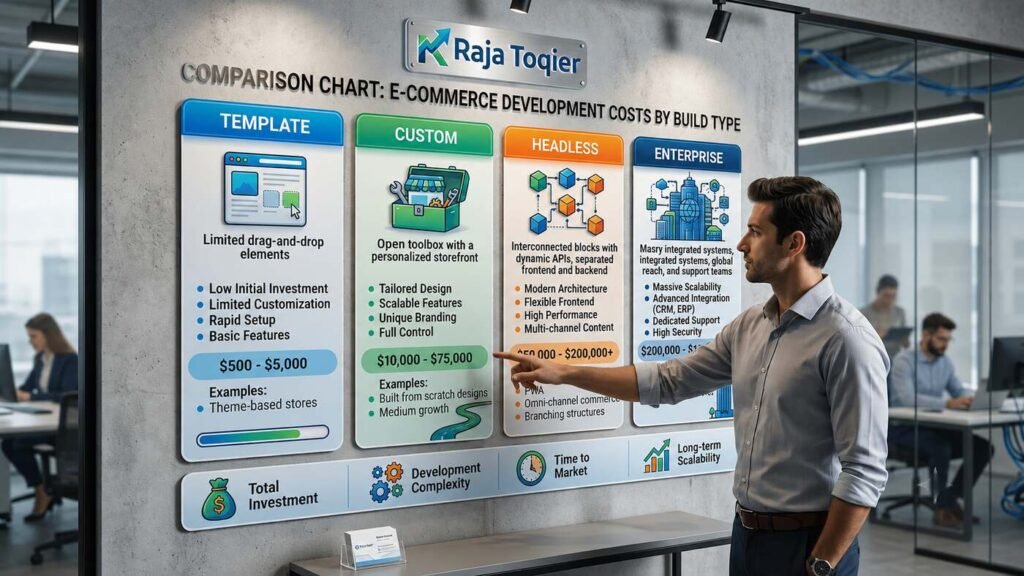
Website Ecommerce Development typically costs between $1,500 and $150,000+, depending on build type: template-based stores run $1,500-$8,000, custom-built sites cost $8,000-$40,000, headless/composable builds range $30,000-$100,000, and enterprise platforms exceed $100,000. Final pricing depends on platform choice, catalog size, third-party integrations, and payment/PCI compliance requirements, with most small-to-mid businesses landing between $8,000 and $40,000 for a professional custom build.
That range looks wide because ecommerce development isn’t a single product – it’s a stack of decisions: platform, design complexity, payment and PCI compliance, catalog size, and how much custom engineering your business model actually needs. Below, we break the cost down by project type, by line item, and by every technical factor that changes the final number.
Ecommerce Development Cost by Project Type
| Build Type | Typical Cost Range | Build Timeline | Best-Fit Business Model |
| Template-Based | $1,500 – $8,000 | 2 – 4 weeks | D2C / early-stage B2C |
| Custom-Built | $8,000 – $40,000 | 6 – 12 weeks | Growing B2C / D2C brands |
| Headless / Composable | $30,000 – $100,000 | 3 – 6 months | Scaling B2C / multi-brand D2C |
| Enterprise | $100,000+ | 6 – 12+ months | B2B / large-catalog B2C |
Ecommerce Development Cost by Line Item
- UX/UI design and wireframing: $1,000-$15,000 depending on scope.
- Frontend build (storefront, theming, responsive layout).
- Backend/API development and third-party integrations.
- QA and cross-browser/device testing before launch.
- Third-party app licensing and subscription fees.
- SSL certificate and PCI-DSS compliance setup.
- Ongoing maintenance retainer for updates and monitoring.
- Abandoned-cart recovery setup (email/SMS automation).
Not sure which build type fits your budget?
Get a tailored ecommerce development estimate →
What Factors Influence Website Ecommerce Development Cost?
Before naming specific platforms, it helps to understand the category itself. An ecommerce platform is the combination of shopping cart, payment gateway, content management system (CMS), and hosting infrastructure that lets a business sell products online. The final Website Ecommerce Development cost is shaped by which of these pieces you choose, how much custom engineering sits on top of them, and how the store needs to scale across channels.
Platform Choice: Shopify vs. BigCommerce vs. WooCommerce vs. Magento vs. Headless
| Platform | Starting Price | Best For | Hosting Model | Extensibility |
| Shopify | ~$5/mo (Starter) | Small businesses, scaling D2C brands | Fully managed SaaS | App store + Liquid theming |
| BigCommerce | ~$39/mo | Multi-storefront, complex catalogs | Managed SaaS | Open APIs, headless-ready |
| WooCommerce | Free core + hosting | WordPress-based small stores | Self-hosted (open-source) | Thousands of plugins |
| Magento (Adobe Commerce) | Custom quote | Large B2B/B2C catalogs | Self-hosted or cloud | Highly extensible, dev-heavy |
| Headless/Composable (Wix Headless, Centra) | Custom quote | Scaling multi-brand D2C | API-first, decoupled | Maximum – build any frontend |
Headless & Composable Commerce Architecture (MACH Explained)
Headless commerce separates the frontend (what shoppers see) from the backend (catalog, cart, and order logic) so each can be built and scaled independently, an approach often summarized as MACH – Microservices, API-first, Cloud-native, Headless.
- Choose headless when you need a highly custom frontend (app, kiosk, multi-brand storefronts) that a template platform can’t deliver.
- Choose headless when traffic or catalog size demands independent scaling of frontend and backend.
- Skip headless for a single storefront on a tight budget – the added engineering cost rarely pays off below a certain scale.
Custom Development Stack & Framework Choices
- PHP frameworks (Laravel, Symfony) for custom Magento or WooCommerce extensions.
- Node.js for API layers and real-time inventory or order services.
- React/Next.js storefronts for fast, SEO-friendly headless frontends.
- GraphQL APIs for efficient, flexible data fetching between frontend and commerce backend.
Hosting Infrastructure, CMS & Open-Source vs. Managed Platforms
| Managed / SaaS | Open-Source / Self-Hosted |
| Hosting, security patches, and uptime handled by the vendor | You manage hosting infrastructure and server security |
| Faster launch, lower dev overhead | Full control over CMS customization |
| Examples: Shopify, BigCommerce | Examples: WooCommerce, Magento open-source |
Multi-language and localization support is also worth checking early – not every platform handles it natively, and retrofitting it later adds cost.
For a deeper platform comparison, see our guide on how to choose the right platform for the best ecommerce website, and if you’re leaning toward Shopify specifically, our 10 essential tips for stunning Shopify website design are worth a read before you budget.
Still weighing Shopify vs. a custom build?
Get a platform recommendation for your business →
Core Steps for Professional Website Ecommerce Development
Every professional build – regardless of platform or budget – follows the same underlying workflow. Skipping a step here is usually where cost overruns and delayed launches come from.
- Define your audience, business model (B2B/B2C/D2C), and product catalog scope.
- Choose a platform or CMS: all-in-one builder vs. open-source vs. headless/composable.
- Architect payment gateways and PCI-DSS/security compliance (Stripe, PayPal, tokenization).
- Build the product catalog and configure inventory/ERP integration.
- Optimize for mobile performance, Core Web Vitals, and page speed.
- Implement structured data, technical SEO, and analytics/reporting dashboards.
- QA, checkout/cart testing, and launch with post-launch maintenance scheduling.
Step-by-Step Timeline: How Long Does Each Phase Take?
| Phase | Estimated Time |
| Audience & scope definition | 3 – 7 days |
| Platform/CMS selection | 1 – 2 weeks |
| Payment & security architecture | 1 – 3 weeks |
| Catalog build & ERP integration | 2 – 6 weeks |
| Mobile & performance optimization | 1 – 2 weeks |
| Structured data & SEO implementation | 1 – 2 weeks |
| QA, testing & launch | 1 – 2 weeks |
Payment Gateway & PCI-DSS Security Implementation
Stripe and PayPal are the two payment gateways named across almost every ecommerce resource, but the implementation details – the part that actually determines security and cost – are rarely explained.
Tokenization & 3D Secure Fraud Detection
Tokenization replaces sensitive card data with a random token at checkout, so your servers never store real card numbers, which sharply reduces your PCI compliance scope. 3D Secure 2.0 adds a second authentication layer for card-not-present transactions, cutting fraud and chargeback risk.
- Use a gateway-hosted checkout or tokenized fields so raw card data never touches your servers.
- Enable 3D Secure 2.0 for high-risk or high-value transactions.
- Log and monitor declined-transaction patterns to catch fraud attempts early.
PCI Compliance Levels Explained (SAQ A vs. SAQ A-EP vs. Level 1)
| Compliance Level | Who It Applies To | Key Requirement |
| SAQ A | Stores using a fully hosted/redirected checkout | Minimal self-assessment; no card data touches your server |
| SAQ A-EP | Stores with a partially custom checkout page | Broader self-assessment; script and iframe security controls |
| Level 1 | Merchants processing 6M+ transactions/year | Annual on-site audit by a Qualified Security Assessor |
Performance Engineering for Ecommerce Websites
Mobile accounts for the majority of ecommerce traffic, which is why mobile responsiveness and performance engineering directly affect both conversion rate optimization (CRO) and search visibility.
Core Web Vitals Checklist for Product & Category Pages
- LCP (Largest Contentful Paint): keep hero/product images under 2.5s load – compress and preload above-the-fold assets.
- INP (Interaction to Next Paint): keep interactions under 200ms – defer non-critical JavaScript.
- CLS (Cumulative Layout Shift): reserve fixed dimensions for images and ads to keep layout stable.
CDN Configuration, Image Optimization & Caching Strategy
- CDN: serve static assets from edge nodes closest to the shopper; enable HTTP/3 where supported.
- Image optimization: use WebP/AVIF formats with responsive srcset sizing per device.
- Caching: cache category pages aggressively, invalidate on inventory or price changes.
ERP, CRM & Tax-Engine Integration for Ecommerce
Inventory management and order management aren’t just backend housekeeping – they determine whether your store can scale to omnichannel selling across marketplace integration points like Amazon, Etsy, and eBay without overselling stock.
Multi-Warehouse Fulfillment & Real-Time Inventory Sync
Multi-warehouse fulfillment routes each order to the nearest or most cost-effective warehouse, while real-time inventory sync keeps stock counts accurate across every sales channel.
- API polling to refresh stock levels on a fixed interval.
- Webhooks to push instant updates when inventory changes.
- Middleware platforms to sync ERP, CRM, and storefront data in one layer.
Automated Tax-Rate Engines (e.g., Avalara) & Compliance
Automated tax-rate engines like Avalara calculate the correct sales tax for every jurisdiction at checkout, which matters once you sell across state or country lines. Pairing this with GDPR and broader data-compliance practices keeps customer data handling audit-ready as you scale internationally.
Selling across multiple warehouses or regions?
Structured Data & Technical SEO for Ecommerce Product Pages
SEO optimization for an ecommerce catalog goes well beyond keywords – it depends on machine-readable markup and a crawlable URL structure that search engines and AI Overviews can parse cleanly.
Schema.org Product & Offer Markup
- name – the exact product title as shown on the page.
- price and priceCurrency – kept in sync with live inventory pricing.
- availability – InStock, OutOfStock, or PreOrder status.
- review rating – aggregateRating for star-rating rich results.
Canonicalization for Faceted Navigation & Sitemap Strategy at Scale
- Set canonical tags on filter/facet URL parameters so filtered views don’t dilute the main product page’s ranking.
- Segment sitemaps by category for catalogs above 10,000 SKUs so crawlers can process them efficiently.
Post-Launch Maintenance, Security Monitoring & Uptime
A launched store is a live liability, not a finished project – ongoing maintenance is where many budgets get underestimated.
Patching, Dependency Updates & Uptime SLAs
- Weekly: monitor uptime and review error logs.
- Monthly: apply security patches and update dependencies/plugins.
- Quarterly: run full checkout and payment-flow regression tests.
- Ongoing: maintain an uptime SLA benchmark of 99.9% or higher.
Get a Custom Website Ecommerce Development Quote
Every number above is a range because your actual cost depends on specifics only you know. To recommend the ideal setup for your project, it helps to know a few things upfront: what kind of products you plan to sell (physical, digital, or services), your estimated budget, and whether you prefer an all-in-one builder or an open-source CMS.
If you’re ready to scope your project properly, explore our ecommerce website design services, or if you’re running a smaller operation, our small business website design page covers lighter-weight options.
Whatever budget or platform you land on, the fastest way to get an accurate number – rather than a range – is a short scoping conversation. Book a free consultation and we’ll walk through your product catalog, integrations, and timeline so you leave with a real quote, not a guess.
You can also explore more resources on the Raja Toqier homepage.
Frequently Asked Questions
Building an ecommerce website from scratch typically costs $8,000-$40,000 for a custom-built store, or upward of $30,000 for headless/composable architecture. Template-based stores start around $1,500-$8,000, while enterprise builds with deep ERP and multi-warehouse integration often exceed $100,000 depending on catalog size and compliance needs.
Shopify suits small to mid-sized stores that want a managed platform with fast launch times and a large app ecosystem. A custom-built site is better once you need unique checkout logic, deep ERP integration, or performance beyond what BigCommerce or Shopify’s theming allows – the trade-off is higher upfront cost for long-term flexibility.
Headless ecommerce decouples the frontend storefront from the backend commerce engine, letting each scale and update independently through APIs. You need it if you’re running multiple brands or channels from one backend or require a highly custom frontend; a single standard storefront rarely justifies the added engineering cost.
A template-based store can launch in 2-4 weeks, a custom-built site typically takes 6-12 weeks, and headless or enterprise builds can run 3-12 months. Timeline depends heavily on catalog size, integration complexity, and how much QA and compliance testing the payment and inventory systems require.
Post-launch costs typically include hosting or platform subscription fees, a maintenance retainer for security patches and dependency updates, third-party app licensing, and payment gateway processing fees. Budget for weekly uptime monitoring, monthly patching, and quarterly checkout regression testing to avoid unplanned downtime or security gaps.