Your Website Could Be Infected Right Now – Here’s Why That Matters
Every day, thousands of websites are silently compromised without their owners ever knowing. If you haven’t taken the time to scan your website for malware recently, you may already be dealing with hidden threats that damage your SEO rankings, steal visitor data, or redirect your traffic to malicious sites. Malware on websites doesn’t always announce itself – it hides inside PHP files. Infects your database or silently injects spam links that only search engines can see. The good news is that with the right approach and the right tools, detecting and removing these threats is entirely within your reach.
Website infections aren’t limited to large corporations or high-traffic platforms. Small business websites, eCommerce stores, and personal blogs are targeted just as frequently – sometimes even more so – because they often lack enterprise-grade security. Understanding how website malware scanner tools work and what to look for can save you from search engine blacklisting. Loss of customer trust and hours of painful recovery work.
What Is Website Malware and How Does It Enter Your Site?
Website malware is defined as any code or script that has been installed to your site’s files, database, or server environment without authorization. While desktop malware infects your computer, website malware infects your server, using your site against you and your visitors, ranking penalties, and stealing data.
Some typical ways website malware enters your site are through:
- Vulnerable extensions: Outdated plugins and themes are the number one way that attackers get into your site.
- SQL injections and XSS attacks: Attackers enter your database or add a script to your site that steals session cookies and alters your site content.
- PHP backdoor scripts: Attackers add a hidden PHP code snippet that allows them to break back into your site after you’ve cleaned it.
- SSL/TLS certificate vulnerabilities: Attackers use vulnerabilities to decrypt your traffic.
- Brute force password attempts: The automated guessing game of trying passwords over and over again.
Warning Signs Your Website Has Been Infected
Not all infections are immediately visible. However, there are several warning signs you should never ignore. Keeping an eye on these indicators can prompt you to act before the damage becomes severe.
| Warning Sign | What It Indicates |
|---|---|
| Sudden drop in organic traffic | Google may have flagged your site for malware or spam |
| Google Safe Browsing warning pages | Your domain has been blacklisted by Google’s threat database |
| Malicious redirect to unknown sites | Malicious redirect and SEO spam injection is active on your server |
| Unfamiliar admin accounts or files | A PHP backdoor or unauthorised access has occurred |
| Spam pages indexed in Google | Database infection and malicious entries have been injected |
| Hosting account suspended | Your host detected malware through server-level malware scanning |
If you’ve noticed any of these signs, it’s critical to act immediately. For a broader framework of site protection, read this in-depth, ultimate website security check guide to protect your site from cyber threats that walks you through every layer of protection your site needs.
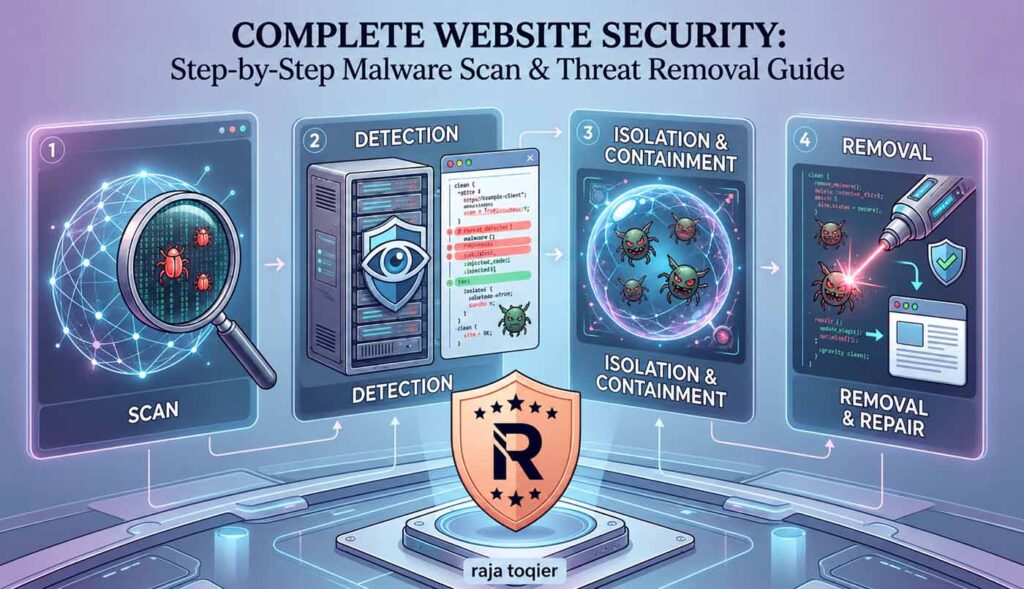
How to Scan Your Website for Malware: A Step-by-Step Process
A thorough malware scan is not just about running a single tool – it involves multiple layers of security vulnerability scanning across your files, database, and external reputation. Here is a structured process to follow.
Step 1: Perform a Free External Website Scan
Start with an external scan using Sucuri SiteCheck, one of the most trusted free website malware scanner tools available. Simply enter your domain, and SiteCheck will analyse your site’s public-facing pages for known malware signatures, website blacklist check status across major blacklists, including Google Safe Browsing, and outdated software versions. This external scan takes under a minute and gives you an immediate health snapshot.
Step 2: Perform Server-Level Malware Scanning
External scanners can only see what is publicly visible. A server-level malware scanning tool like Wordfence (for WordPress), ImunifyAV, or cPanel’s built-in scanner goes deeper – examining every PHP file, theme file, and plugin directory on your hosting server. This layer of scanning detects PHP backdoors and .htaccess infection that external tools will miss entirely. Always run a full server scan before concluding your site is clean.
Step 3: Apply Signature-Based and Heuristic Malware Scans
State-of-the-art malware scanners integrate signature-based malware detection with heuristic and behavioural analysis. Signature-based scanning is performed by comparing known malware code signatures against an extensive threat database. Meanwhile, heuristic scanning detects unusual behaviour or codes that do not yet have a signature – this makes it very useful in detecting zero day exploits and custom malware. Using a malware scanner that performs both types of scan greatly increases your chance of successful detection.
Step 4: Review Your Database for Any Malicious Entries
Often, malware uses the database of your CMS to plant links, create fake admin accounts, or keep any malicious redirections rules. Using phpMyAdmin or your control panel of choice, check the database entries in your options, users, or posts tables. Look especially for any obfuscated JavaScript or encoded strings in your content. These are signs that your database is infected and there are malicious entries you should take care of right away.
Step 5: Check File Integrity
Use file integrity monitoring to compare your current site files against the original clean versions. Most CMS platforms – including WordPress – offer tools to verify core file checksums. Any file that has been modified unexpectedly is a red flag. Pay particular attention to your wp-config. Php, index. Php, and any. Htaccess files, as these are commonly targeted by attackers.
How to Remove Malware From Your Website Fast
Once malware is detected, fast and deep removal is needed. Leaving even a small fragment of infected code can result in re-infection within hours. Here’s the thing, here is how to approach automated malware cleanup and manual removal well.
- Restore the data from backup file: If you’ve a recent backup, restoring it is often the fastest path to a clean site. Just make sure the backup you choose is a clean version.
- Manually remove malicious files: The affected files can be deleted and replaced with new copies of the same software downloaded from their source websites.
- Clean your database: Remove any suspicious entries, injected scripts, or malicious redirects identified in your database scan.
- Change all passwords: You must change the admin passwords, the database passwords, the FTP passwords, and all other account credentials used in the hosting control panel.
- Perform updates: Update your CMS and all plug-ins and themes to the most recent version because that would ensure closing the loophole exploited by hackers.
- Submit for Google review: After you fix your website, submit it to Google for malware checking and removal from the Safe Browsing list.
Guarding Your Website into the Future with a Web Application Firewall
While cleaning out malware might be halfway there, to ensure that you do not get hit again in the future, install a web application firewall (WAF) to block any malicious activity from reaching your server in the first place. A quality WAF blocks SQL injection and cross-site scripting attacks in real time, and many solutions provide OWASP Top 10 vulnerability coverage – the industry standard for web application security. Combined with real-time continuous website monitoring, a WAF drastically reduces your attack surface and gives you advance warning of threats before they become full-blown infections.
For websites that process online transactions or store customer data, pairing your WAF with a secure, well-maintained eCommerce website design foundation is equally important. A poorly structured or outdated website architecture creates unnecessary vulnerabilities regardless of the security tools installed on top of it.
Malware and Its Hidden Impact on Your SEO Performance
Many website owners focus exclusively on the security aspect of malware, but the SEO consequences can be just as devastating. When malicious redirects and SEO spam injection go undetected, search engines index spam pages on your domain, tanking your authority and triggering manual actions from Google. A website blacklist check should therefore be a standard part of your monthly SEO monitoring routine, not just a reactive measure.
Technical SEO and website security are inseparable. Website malware, website crawl problems that are a result of malware infections, and internal linking problems because of injected code are all negative signals for search engines. In case your website has recently experienced some unexpected decline in its rankings, a Technical SEO audit together with malware scanning can help identify the source of the problem.
Creating a Long-Term Plan to Avoid Website Malware
The best possible way to combat website malware is not reactive action, but a multi-faceted security approach. Below is a suggested plan:
| Frequency | Security Task |
|---|---|
| Daily | Website real-time continuous monitoring using WAF and security plugin alerts |
| Weekly | Automated malware detection scan using server-based tools |
| Monthly | Website blacklist check and verification of Google Safe Browsing |
| Monthly | File integrity check comparing files to core files |
| Quarterly | Security vulnerability testing which includes OWASP Top 10 |
| Quarterly | Update of all plugins, themes, and CMS core version |
| Annually | Penetration test and SSL/TLS certificate check |
Furthermore, make sure that your website is based on a reliable foundation. Whether you have a small business website or a complex enterprise platform, the collaboration with people who know the ins and outs of website design and security is priceless. Our website security and HTTPS solutions will provide you with a top-notch protection for all layers of your website – from setting up the SSL certificates to monitoring for malware.
Ready to Safeguard Your Website? Take Action Today!
Malicious attacks on websites become more and more frequent each year. No matter whether you deal with PHP backdoor and .htaccess infection or SEO spam injection into your website code, the process of its reversal may cost you many precious months if neglected. It always takes much less effort to prevent malware than to fight it. Let our experts help you make your website immune to malware and perform effectively in search results.
If you are looking for a professional to help you set up the malware protection system for your website and monitor its safety, do not hesitate – contact us now!